
ABOUT LOOKOUT MEMBERSHIP
- What does it mean to be a Lookout Santa Cruz member?
- Is Lookout’s membership program the same as a subscription?
- How much does a Lookout membership cost?
- What kind of member perks do you offer?
- What do I get as a Lookout member?
TECHNICAL MEMBERSHIP QUESTIONS
- Can I share my Lookout membership?
- When I sign up to become a Lookout Santa Cruz member, how will I know when my purchase is complete?
- How do I sign in and stay logged in?
- I forgot my password or have not set one yet, how do I reset it?
- Why has my saved log-in session expired?
- How do I update my account information, like my email address?
- How do I update my credit card?
- If I want to stop auto renewing my membership, how do I do that?
- If I want to cancel my membership, how do I do that?
- Will you update me before I auto renew?
- Do you offer group membership discounts for businesses and organizations?
- Is there a Lookout app I can use?
- How do I sign up for newsletters?
- Do you have a student or educator discount?
- How does your Student Access Program work?
- Can I upgrade my monthly membership to an annual membership?
- How can I share an article with someone who is not a member?
Is your question not on here or have more questions?
Reach out to Brittany Ramirez at membership@lookoutlocal.com
- What does it mean to be a Lookout Santa Cruz Member?
Being a Lookout Member means you have paid to get full access to our site and to support our work and mission. Plus, members receive additional special benefits such as member events, and first access to special events and experiences, Lookout merchandise, and more. You can become a Lookout member here.
- Is Lookout’s membership program the same as a newsletter subscription?
No, our members enjoy unlimited access to all our stories on our website and app. Our email newsletters are a free product that delivers our headlines and updates directly to you inbox.
- How much does a Lookout membership cost?
You can check out our current offers on our membership page.
If you are financially unable to make this happen, please send us an email membership@lookoutlocal.com, we want our content to be accessible.
For information about our free student and educator memberships click here.
- What kind of member perks do you offer?
Throughout the year, we offer exciting member-only perks. Sometimes it’s Lookout merch, sometimes it’s a chance to share feedback on a story; from opportunities to try out new tech first to exclusive events, we love our members! Got a perk idea? Let us know!
- What do I get as a Lookout member?
Members get more Lookout! Here is what you will enjoy as a Lookout member.
- Support Local Journalism. Your membership directly pays our journalists, dedicated to covering Santa Cruz life in the fullest sense. Keeping you informed about topics that matter and up to date on all the arts, food and events that make Santa Cruz great.
- Gain unlimited access to all our news coverage. You can read all the articles on our site and be in the know about your community. Make sure to save your login to all your devices for easy reading wherever you go
- Have Santa Cruz insider experiences. Meet our Lookout correspondents and enjoy exclusive member experiences such as curated tours, private tastings, and behind-the-scenes experiences.
- Can I share my Lookout membership?
You are welcome to share your membership within your household. You can do this by simply sharing the email address associated with your membership and your Lookout sign-in password. Since Lookout Santa Cruz is largely paid for by reader membership, we ask you not to share more widely.
- When I sign up to become a Lookout Santa Cruz member, how will I know when my purchase is complete?
When you complete your membership purchase, you will receive an email from Lookout Santa Cruz with the subject line “Thank you for becoming a Lookout Member.” Please be sure to check your email spam folder if it doesn’t arrive in your primary inbox.
You can also check on your subscription details under ‘My Account’ in the top right corner of your screen.
- How do I sign in and stayed logged in?
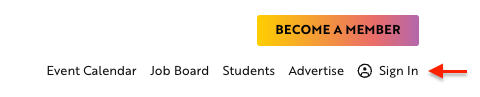
Select the ‘Sign in’ button in the top right hand corner
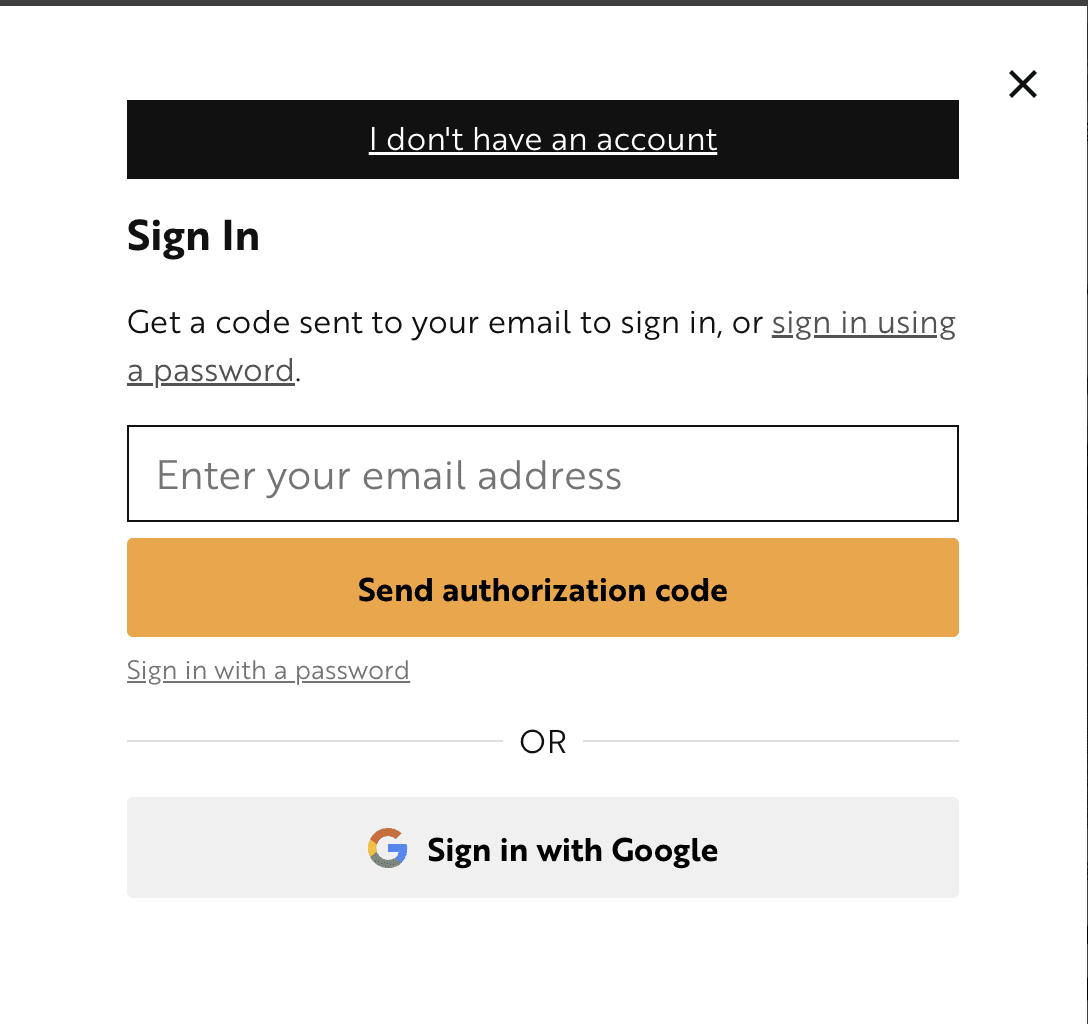
- In the pop-up window, enter the email address of your member account and either:
- Click send authorization code
- Click sign in with password
- Sign in with Google
If you choose authorization code, you will need to check your email for a 6-digit code that you can type or paste into the form and click “Sign in”.
If you choose a password, you will log in with your member email address and password.
If you choose Google sign in, you will click that button and sign in with your Google information.
9. I forgot my password or have not set one yet, how do I reset it?
There are two ways to reset your password, you can:
- Select the ‘Sign in’ link in the top right hand corner or click here.
- In the resulting form, enter your email then select “Forgot password”.
- Check your inbox for an email with a link and instructions to reset your password.
- After resetting your password, you’ll need to log in with that new password.
If you are having any trouble, reach out to membership@lookoutlocal.com and we can set one for you.
10. Why has my saved log-in session expired?
Log-in sessions last a maximum of one year, for security reasons. Your browser may also expire sessions on its own. This may happen periodically, depending on your browser’s settings. If your browser data or cookies are cleared, our system will no longer remember your past activity.
11. How do I update my account information, like my email address?
Follow these steps:
- Sign in using the instructions above.
- Click the My Account link at the top-right
- Here you can change your name, password, email and newsletter preferences.
- Make sure to hit save changes


12. How do I update my credit card?
Follow these steps:
- Make sure you are logged in (use above instructions if need help signing in)
- Select My Account in the top right
- Select the Payment Methods tab
- Update credit card information and select Save changes
13. If I want to cancel my auto-renewal my membership, how do I do that?
You can turn off your auto-renewal by going into your account, clicking ‘My Subscription’ and then clicking the cancel button. If you change your mind and want to turn it back on, there is a button in this same space that says ‘renew’. Please email membership@lookoutlocal.com if you have any questions or need any help.
14. If I want to cancel my membership, how do I do that?
If you would like to cancel your membership, you will follow the same instructions as turning off your auto-renewal. You can turn off your auto-renewal by going into your account, clicking ‘My Subscription’ and then clicking the cancel button. This will not give you a refund. Please email membership@lookoutlocal.com if you are needed us to complete a refund in regards to your cancellation.
15. Will you update me before I auto renew?
Yes! You will receive an email 30 days before your membership is set to renew and this will give you the reminder of the upcoming membership charge to your credit card. Please be sure to check your email spam folder if it doesn’t arrive in your primary inbox.
16. Do you offer group membership discounts for businesses and organizations?
We do. Whether you’re looking to purchase memberships for your employees, or offer them special discounted memberships, Lookout has flexible plans to meet your needs. Business memberships begin at 3 individuals or more, and can be tailored per company or organization. Contact membership@lookoutlocal.com to get in touch.
17. Is there a Lookout app I can use?
The Lookout Santa Cruz app is available now in both the Apple App Store and Google Play Store. Catch up on the latest headlines, discover local events, or enjoy a puzzle break, our app has it all. Plus, Lookout members can enjoy a playlist of the day’s top headlines, perfect for staying informed on the go. Learn more here.


18. How do I sign up for newsletters?
First, go to our Newsletter page
- Choose from any of the newsletters we offer that you would like to receive to your email
- Click “Sign up’
19. Do you have a student or educator discount?
Yes! Lookout memberships are FREE for UCSC, Cabrillo, local high school students and local high school educators.
For Students: Click here to learn more, sign up and gain access.
For Educators: Click here to learn more, sign up and gain access.
20. How does your Student Access Program work?
Students, now more than ever, need access to trustworthy, factual, non-partisan news. With Lookout’s special Student Access Program, they get it.
This program only starts with access and works to engage local students with news, projects, contests and scholarships. Read more about our student engagement programs here.
We also have an educator page for teachers which includes lessons, quizzes and media literacy curriculum.
We are so happy to offer these programs which have been funded by generous donors and grants. We do seek to serve other deserving groups. Please contact CEO Ken Doctor at ken@lookoutlocal.com to talk about supporting these programs. Reach out to Jamie Garfield, director of Student Engagement for more information on programs or any class visits jamie@lookoutlocal.com
21. Can I upgrade my monthly membership to an annual membership?
- If you are not signed in, go to “Sign In”
- If you are signed in (and maybe don’t know it), go to “My Account”
- On left of that page, click “Subscriptions”
- Under “Subscription Totals” you can choose to cancel or change your subscription.
- To upgrade or downgrade your subscription, select “upgrade or downgrade” found beneath the product listing you would like to change.
- Select “switch subscription” (this will open in a new window)
- View cart and complete checkout
22. How can I share an article with someone who is not a member?
- Click on the present logo at the top of every article
- Click the ‘Copy link’ box and share the link with the person you are wanting to view this article. They will have access to this link and the story for free for 7 days. You can gift up to 6 articles a month!
Is your question not on here or have more questions?
Reach out to Brittany Ramirez at membership@lookoutlocal.com